UFO detects light

In a previous post (UFO has Landed)  I started playing with the CBiSEducation's UFO Consumable Robotics. Now I am going to play with it a bit more and add the light sensor, included in the kit, to it;is so it can detect different light levels. Again it is controlled using the Micro:Bit.

Stage 1 - Decorating it
The kit comes with some stickers so I added a few.

Stage 2 Wiring
Pins 0 and 1 are outputs to the LEDs
Pin 2 is the input from the light sensor
The red lead from the light sensor connects to 3v and the grounds to the ground.


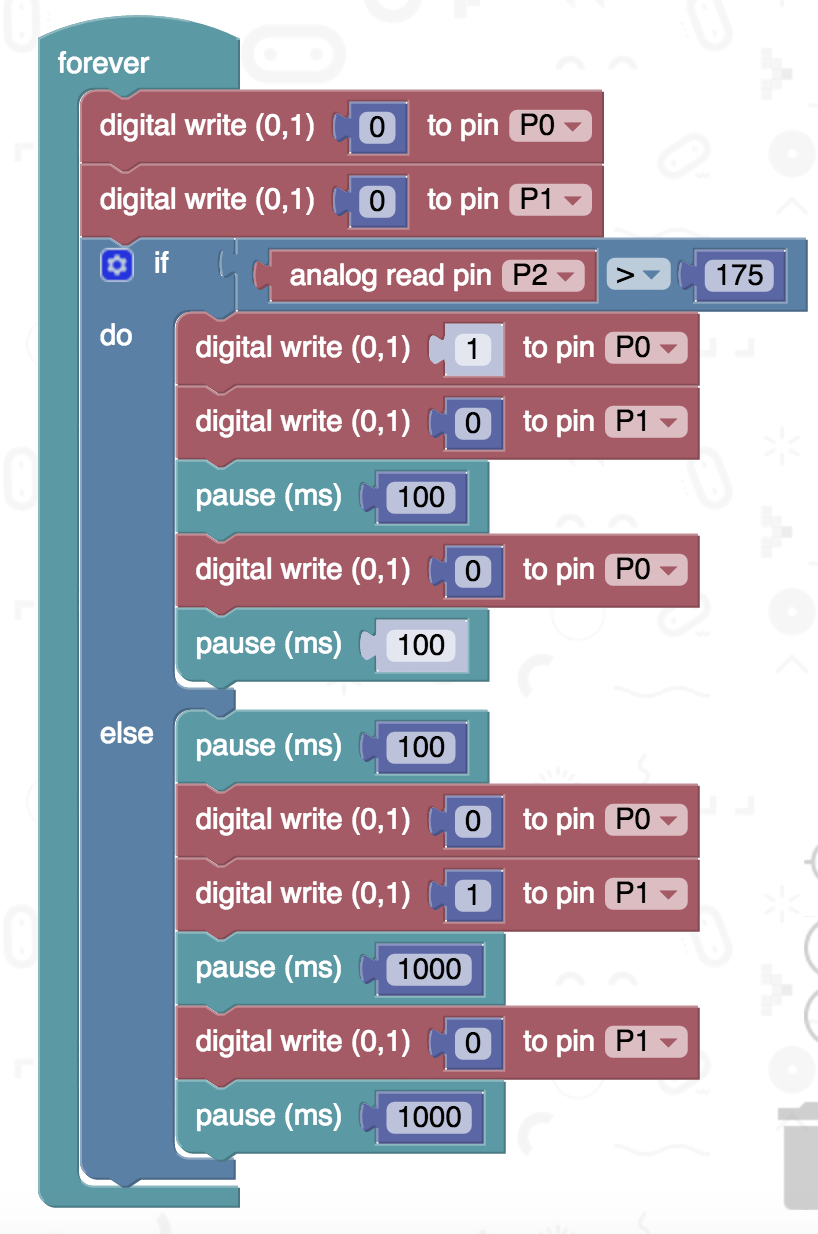
Stage 3 Code

The light sensor works more as a low light level detector, the darker the higher the value returned (in this case) on pin 2. So in low light level,  the LEDs flash relatively quickly, when the light level rises half of the LEDs start to pulse more slowly.


All opinions in this blog are the Author's and should not in any way be seen as reflecting the views of any organisation the Author has any association with.

Comments

Popular posts from this blog

Robot Software

In the previous blog posts for this 'series' "It is a good time...."  Post 1  looked at the hardware unpinning some of this positive rise in robots; Post 2  looked at social robots; Post 3  looked at a collection of small robots; Post 4 looked at further examples of small robots Robots, such as the forthcoming Buddy and JIBO, will be based some established open sourceand other technologies. Jibo will be based around various technologies including Electron and JavaScript (for more details see:  http://blog.jibo.com/2015/07/29/jibo-making-development-readily-accessible-to-all-developers/ ). Buddy is expected to be developed around tools for Unity3d, Arduino and OpenCV, and support Python, C++, C#, Java and JavaScript (for more details see http://www.roboticstrends.com/article/customize_your_buddy_companion_robot_with_this_software_development_kit ).  This post contin ues with some of the software being used with the smaller robots.  A number ...

Speech Recognition in Scratch 3 - turning Hello into Bonjour!

The Raspberry Pi Foundation recently released a programming activity Alien Language , with support Dale from Machine Learning for Kids , that is a brilliant use of Scratch 3 - Speech Recognition to control a sprite in an alien language. Do the activity, and it is very much worth doing, and it will make sense! I  would also recommend going to the  machinelearningforkids.co.uk   site anyway it is full of exciting things to do (for example loads of activities  https://machinelearningforkids.co.uk/#!/worksheets  ) . Scratch 3 has lots of extensions that are accessible through the Extension button in the Scratch 3 editor (see below) which add new fun new blocks to play with. The critical thing for this post is  Machine Learning for Kids  have created a Scratch 3 template with their own extensions for Scratch 3 within it  https://machinelearningforkids.co.uk/scratch3/ . One of which is a Speech to Text extension (see below). You must use this one ...

Escape the Maze with a VR robot - Vex VR

You don't need to buy a robot to get programming a robot, now there are a range of free and relatively simple to start with robot simulators to play with. Three examples are listed below: - Make code for Lego EV3  https://robotsandphysicalcomputing.blogspot.com/2020/05/programming-robots-virtually-3-lego-ev3.html   - i Robot simulator  https://robotsandphysicalcomputing.blogspot.com/2020/04/programming-robots-virtually-2-irobot.html - Vex robotics Vexcode VR   https://robotsandphysicalcomputing.blogspot.com/2020/04/programming-robots-virtually-1-vexcode.html   It is the last one of these ( https://www.vexrobotics.com/vexcode-vr ) that is the focus of this post and return to hit, after an earlier discussion in  https://robotsandphysicalcomputing.blogspot.com/2020/04/programming-robots-virtually-1-vexcode.html   .  Two of the nice things about the package, apart from being free, are it uses a Scratch-like programming language and it provides a ...