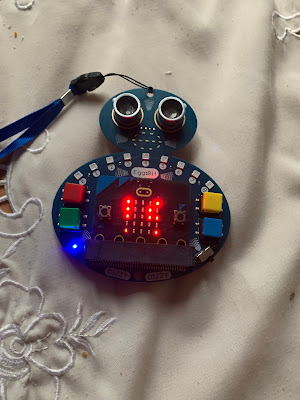
Hug Avoider 2 - #4tronix #Eggbit


starting hug avoider 2


In an earlier post this year ( 4tronix Eggbit - cute and wearable - hug avoider) I played with 4Tronix's Eggbit (in fact I bought three of them https://shop.4tronix.co.uk/collections/bbc-micro-bit/products/eggbit-three-pack-special  :-) recently). In that one I used a microbit V1.

In this post, I am using a microbit V2 and replicating the idea but with adding a sound; when people get too close as a bit of fun and surprise for relatives at christmas. 

The code written using Makecode for Microbit (https://makecode.microbit.org/) and the extension for it 4Tronix's developed (see https://4tronix.co.uk/blog/?p=2485 for more details)  is shown below:
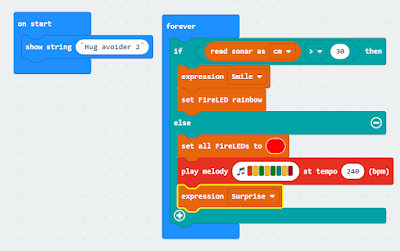

makecode for microbit for the hug 2 avoider

Essentially the device goes on; puts a message on the LED display "Hug Avoider 2" and then puts a rainbow on the neopixel syle LEDs and a smile on the small 'mouth' - if the ultrasonic sensor doesn't pick up anyone in front.


No one getting ready to hug


If the ultrasonic sensor picks up anyone in front; LEDS change to red, a sped-up version of one of the standard tunes in Makercode is played and the mouth changes to a surprised look.
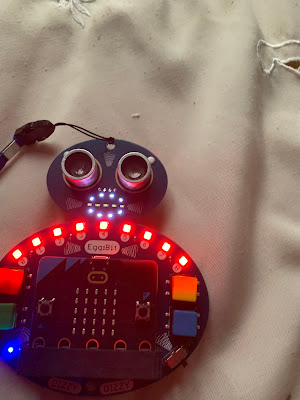
detecting someone is too close


Good fun, didn't stop anyone and my son made one with the LEDs lighting up as the person got closer.


What I want to look at is the possibility of programming it with Python - something for the new year.


All opinions in this blog are the Author's and should not in any way be seen as reflecting the views of any organisation the Author has any association with. Twitter @scottturneruon

Comments

Popular posts from this blog

Robot Software

In the previous blog posts for this 'series' "It is a good time...."  Post 1  looked at the hardware unpinning some of this positive rise in robots; Post 2  looked at social robots; Post 3  looked at a collection of small robots; Post 4 looked at further examples of small robots Robots, such as the forthcoming Buddy and JIBO, will be based some established open sourceand other technologies. Jibo will be based around various technologies including Electron and JavaScript (for more details see:  http://blog.jibo.com/2015/07/29/jibo-making-development-readily-accessible-to-all-developers/ ). Buddy is expected to be developed around tools for Unity3d, Arduino and OpenCV, and support Python, C++, C#, Java and JavaScript (for more details see http://www.roboticstrends.com/article/customize_your_buddy_companion_robot_with_this_software_development_kit ).  This post contin ues with some of the software being used with the smaller robots.  A number ...

Speech Recognition in Scratch 3 - turning Hello into Bonjour!

The Raspberry Pi Foundation recently released a programming activity Alien Language , with support Dale from Machine Learning for Kids , that is a brilliant use of Scratch 3 - Speech Recognition to control a sprite in an alien language. Do the activity, and it is very much worth doing, and it will make sense! I  would also recommend going to the  machinelearningforkids.co.uk   site anyway it is full of exciting things to do (for example loads of activities  https://machinelearningforkids.co.uk/#!/worksheets  ) . Scratch 3 has lots of extensions that are accessible through the Extension button in the Scratch 3 editor (see below) which add new fun new blocks to play with. The critical thing for this post is  Machine Learning for Kids  have created a Scratch 3 template with their own extensions for Scratch 3 within it  https://machinelearningforkids.co.uk/scratch3/ . One of which is a Speech to Text extension (see below). You must use this one ...

Scratch and web-cams in Scratch 3

Scratch 3 was launched on 2nd January 2019, so I wanted to know would Webcams still work with Scratch 3 as it did with Scratch 2. For example, in a previous post  Scratch, webcams, cats and explosions  the cat (Scratch) moved across the screen and a button burst when the object moved in the camera onto it.  Can the same thing be done in Scratch 3? The short answer is yes, but it is done slightly differently. The first change the video capture is not there in the blocks automatically; but is an extension that needs to be added. First, you need to add the extension blocks for video sensing. Go to the little icon at the bottom left of the screen (as shown below) this takes you to the extensions menu. Next, find the Video Sensing option and selected. The webcam, if enabled, with start automatically. A video sensing set of blocks is now in the list of block options.  The rest is very similar to doing this in Scratch 2. Moving ...