
Programming Robots Virtually 3: LEGO EV3


In this series of posts, I am going to look at experimenting with a few tools that allow robots to be simulated, programmed, these are ideally web-based, free and simple to use. In this post,the focus is on one that has been around for a while Makecode for the LEGO Mindstorms EV3 robotics kit available at https://makecode.mindstorms.com/#editor another example of the flexible MakeCode format. A very useful guide to using this coding tool is available at https://makecode.com/blog/lego/05-15-2018


This time it does not give you a built robot but a programmable simulation of the Brick, all the sensors and motors; which it automatically connects together depending on the code (see above). I like this idea it means it is flexible, as well as encouraging thinking about the design and operations of the programs before trying it out physically.


So to experiment with it.  I played with a number of elements:


When touch sensor is pressed (looks like a box with a cross on it) drive one of the motors forward, when that sensor is released the motor reverses.  Following this I added the ultrasonic sensor (the one that looks like two eyes); when an object is near (controlled in the simulator by moving the slider upwards), the motors B and C rotate 5 times. The code is relatively easy and can be seen below.


Now to play with the brick itself. The first operation, is when it starts add a 'mood' set of wide-open eyes in this case, on the Bricks screen, when the enter button [the central button on the brick], show a happy face on the screen, wait and add a purring sound and write Be Happy on screen. Lastly when Red (a set of pressable colours appears near the sensor) is detected using the colour sensor put an expression on screen and when blue detected put a closed-eyed expression on screen (the code is shown below and all the code at 
https://makecode.com/_016aUf2YtDx6 might need to change it to blocks by changing a tab at the top of the screen)
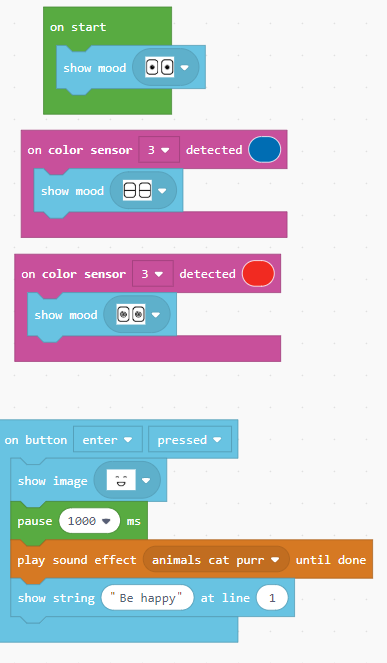


Opinion.

I like Makecode anyway, but I think this is another good use of it. There is no installation needed to run the code and simulator and no LEGO has to be bought. If you have a Mindstorms EV3 kit, you can download your code to a physical EV3 robot (or whatever you have built using EV3). I would love to see in the comments what people have done with it as well.

Play with it yourself below:


The code used is available at https://makecode.com/_016aUf2YtDx6 


All opinions in this blog are the Author's and should not in any way be seen as reflecting the views of any organisation the Author has any association with. Twitter @scottturneruon

Comments

  1. Virtual and augmented reality are among the most anticipated forms of content to arrive over 5G networks. Please see my site. VR Ottawa

    ReplyDelete

Post a Comment

Popular posts from this blog

Robot Software

In the previous blog posts for this 'series' "It is a good time...."  Post 1  looked at the hardware unpinning some of this positive rise in robots; Post 2  looked at social robots; Post 3  looked at a collection of small robots; Post 4 looked at further examples of small robots Robots, such as the forthcoming Buddy and JIBO, will be based some established open sourceand other technologies. Jibo will be based around various technologies including Electron and JavaScript (for more details see:  http://blog.jibo.com/2015/07/29/jibo-making-development-readily-accessible-to-all-developers/ ). Buddy is expected to be developed around tools for Unity3d, Arduino and OpenCV, and support Python, C++, C#, Java and JavaScript (for more details see http://www.roboticstrends.com/article/customize_your_buddy_companion_robot_with_this_software_development_kit ).  This post contin ues with some of the software being used with the smaller robots.  A number ...

Speech Recognition in Scratch 3 - turning Hello into Bonjour!

The Raspberry Pi Foundation recently released a programming activity Alien Language , with support Dale from Machine Learning for Kids , that is a brilliant use of Scratch 3 - Speech Recognition to control a sprite in an alien language. Do the activity, and it is very much worth doing, and it will make sense! I  would also recommend going to the  machinelearningforkids.co.uk   site anyway it is full of exciting things to do (for example loads of activities  https://machinelearningforkids.co.uk/#!/worksheets  ) . Scratch 3 has lots of extensions that are accessible through the Extension button in the Scratch 3 editor (see below) which add new fun new blocks to play with. The critical thing for this post is  Machine Learning for Kids  have created a Scratch 3 template with their own extensions for Scratch 3 within it  https://machinelearningforkids.co.uk/scratch3/ . One of which is a Speech to Text extension (see below). You must use this one ...

WebVR 3 Playtime: Augmented Reality

I am going to try to persuade you that using A-Frame it is not hard to do some simple Augmented Reality (AR) for free, via a browser, but that also can run on a mobile device. Introduction This is part of a short series of articles about some experiments with WebVR Web-based Virtual Reality - in this case based on the wonderful A-Frame  ( https://aframe.io )   .  In the first post  WebVR playtime 1: Basics of setting up, images and rotating blocks ,  I looked at setting up a scene and then rotating an object.  In the second pos t, recapped the basics, then look at adding video, 360 degree video, and models developed elsewhere. In this post we are going to start looking at using WebVR as part of an augmented reality solution. I going to start by building on the great resource Creating Augmented Reality with AR.js and A-Frame by Jerome Etienne, creator of AR.js - the starting code below and the basis of the solution ...